Sunday, October 13, 2013
Plan

1. Open a Word document
2. Title (save as) your document, Term 1 Plan,
3. Type your name at the top left,
4. Space down, type: PLAN (all caps, centre justify),
5. Space down, type: Resources
Let's brainstorm the resources each of you will need to create your Prezi.
6. Type the list of resources that we have created,
7. Space down and type: Plan,
Open Prezi
8. Begin to create a list of the steps you will need to take to create your prezi and the amount of time you think it will take (1 min is the minimum)
Start like this:
1. Open Prezi (http://prezi.com) , 1 minute
2. Log in, 1 minute
Continue on until you have included everything necessary to complete your Prezi.
Remember: You can use the phrase See Design when appropriate.
9. Add up the minutes.
10. Figure out how many lessons it will take to create your prezi. Your presi is due November 18. How many lessons will you need to create your prezi. Organize your tasks and say which lesson you will complete each task. (For example: November 8, Steps 1-4).
11.Then write a paragraph saying why you think your plan will work. Remember that you have lots of experience with Prezis. You have done a tutorial, you've created a practice prezi and you had Prezi open when you were creating your plan. You can build a persuasive paragraph using this information.
IB Learner Profile: Knowledgeable
Learning Objectives for Plan: The student will: devise, with guidance, a series of logical steps to create the product/solution; construct a plan to create the product/solution that makes effective ue of resources and time; analyze the plan and explain the need for any modifications to the plan.

Friday, October 4, 2013
Design

Year 8, it's on to the Design, Criterion B.
We have to:
1. Create 3 designs for your Prezi (each of your designs must be complete and each must be very different for each other.)
2. Evaluate each design against your design specification ( You can begin like this: Design 1 meets my design specification because . . .)
3. Choose 1 design and write a paragraph to justify your choice.
We will create 3 designs on blank paper.
A complete design must contain: image, youtube video, rotated text, drawing, clear path, 1 shape, custom colour, custom font colour. You may have Prezi open to help you make decisions about colours, shapes, drawings, etc.
Let's look at this example: http://prezi.com/shszyp_nvxxr/tech-lunch/
For help you can consult the Prezi Cheat Sheet: http://prezi.com/learn/get-started-cheat-sheet/
If you don't understand the assignment, please raise your hand so I can help you. Thanks so much for that;-)
IB Learner Profile: Knowledgeable
Learning objectives - The student will: generate 3 designs that attempt to meet the design specification, compare the designs against the design specifications and identify the pros and cons of each design; select one design and explain its choice.
Wednesday, October 2, 2013
Using Prezi - some basics
1. Setting the path For more guidance click on this link:https://prezi.zendesk.com/entries/22428183-Setting-your-prezi-s-path
2. General written tutorial all about creating your first prezi: http://www.berks.psu.edu/Documents/Academics/Prezi_CreatingPresentations.pdf
3. Zooming in Prezi. It's easy and fun!
Thursday, September 26, 2013
Investigate - Prezi Tutorial
 |
| http://ad-tech.blogs.imediaconnection.com/files/2011/03/prezi-logo.jpg |
Then do the tutorial to get a feel for what Prezi can do.
Remember that you will have to generate 3 designs and actually create your Prezi based on this research;-)
http://prezi.com/learn
IB Learner Profile: Inquirer
Learning Objective: The student will complete a tutorial and become proficient using a productivity tool.
Sunday, September 22, 2013
Investigate - 3. Formulate a Design Specification
 |
| http://www.technologystudent.com/images4/specy3.jpg |
Based on your research you should have a good idea about what makes a successful Prezi presentation.
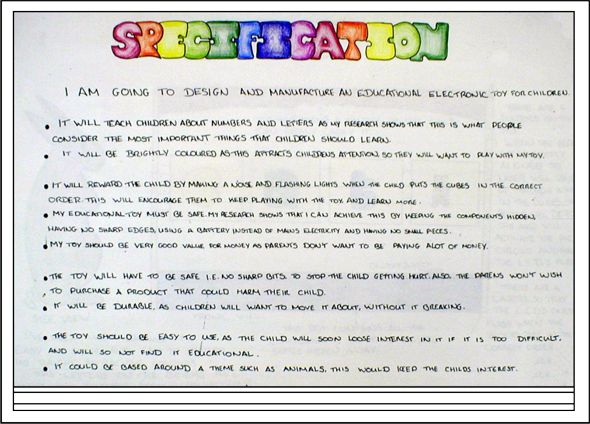
The IBO says that the design specification is "A detailed description of the conditions, requirements and restrictions with which a design must comply. This is a precise and accurate list of facts such as conditions, dimensions, materials, process and methods that are important for the designer and for the user. All appropriate solutions will need to comply with the design specification."
Include a detailed list of 5 specifications.
Then create a test that will help you evaluate your product/solution in Criterion E - Evaluate.
________________________________________________________________________________
Let's brainstorm some possible design specifications . . .
3. Formulate a Design Specification
My Prezi must possess the following characteristics:
1. Correct spelling This is a good design specification because. . .
2.
3.
4.
5.
To test my Prezi I will create a questionnaire. On a scale of 1-5 (1=awful, 5=awesome) I will ask the following questions:
1.
2.
3.
4.
5.
Investigate due date September 30 at the beginning of class.
IB Learner Profile: Thinker
Learning Objectives: The student will list, with little guidance, the specific requirements that must be met by the product/solution and design, with limited guidance, tests to evaluate the product/solution against the design specification. The student will design, with guidance, tests to evaluate the product/solution against the design specification.
Thursday, September 12, 2013
Investigate - 2. Develop A Design Brief

To learn more about Prezi click here
Year 8, each one of you has completed the Identify the Problem. Yoohoo! You did a good job. Now, let's move on.
Remember that at the beginning of each class we get together and discuss what the goals and objectives of the daily assignment is. I explain exactly what is expected of you. If you don't understand the assignment, raise your hand and I will be happy to offer you further information.
2. Develop a Design Brief
Introduce this section by writing a small sentence explaining that this is the section of the Investigate in which you will do research (ask and answer questions) that will help you solve your unit problem. (for example: The following research questions will give me enough knowledge to solve my unit question.)
Then, research the following questions:
1. What is Prezi? (Include a definition using your own words.)
2. Look at 2 Prezi's to get ideas and information to help you make a creative presentation.
https://sites.google.com/site/prezilinks/home/prezi-examlpes
- Include printscreen of Prezi
- Describe what the presentation is about
- Do you like it? Why or why not?
- Did you get any ideas that you would like to use in your Prezi
3. Gather information on your topic to put on your Prezi to share with others.
Use in-text referencing and include images to support your work.
IB Learner Profile - Inquirer
Learning objectives: The student will identify websites as possible sources of information, learn how to reference sources.
Wednesday, September 11, 2013
Investigate - 1. Identify the Problem
 |
| http://www.computerperformance.co.uk/images/Vista/network_identify_problem.jpg |
1. Identify the problem,
2. Develop a design brief,
3. Formulate a design specification.
The "Identify the Problem" is the introduction to our project. It consists of two paragraphs.
Paragraph one must contain the following: it must state the CT problem that we are trying to solve, it must discuss "relevance" (why we are doing this project), the solution, and it must say who our audience (customer) is.
Paragraph two must say what our area of interaction is and state how your project connects to that area of interaction.
You may follow the Investigate Template which is located here.
Learning Objectives - The student will: consider the importance of the problem within a wider context and outline a simple design brief.
Wednesday, September 4, 2013
Prezi
Year 8,
Wow! We are starting a new unit of work today.
The guiding question is: How can I help change the world? Our Area of Interaction is: Environments. We will try to answer the question: How can technology influence the environment? Prezi is the tool we will use to create is a dynamic presentation to raise awareness about an environment issue.
But before we go any further let's look at the videos.
Global Warming
Biodiversity and ecosystem losses - extinction of species
Deforestation
Water Shortages
Ocean Pollution
Now, I would like to you do research and choose a topic that you would like to educate others about.
Here are 2 links to get you started:
http://www.un.org/en/globalissues/
http://www.globalissues.org/
Some companies are very worried about the environment too and have started their own campaign. Haagen Dazs is one such company. Check out this link which helps us learn about the plight of the honey bee: http://www.helpthehoneybees.com/
Year 8, we are now ready to begin documenting our project.
Let's open a Word document.
Put your name in the upper left hand corner, include your tutor group.
On the next line type the word INVESTIGATE (all caps, bold) and centre it.
On the next line type 1. Identify the Problem (bold).
Now I would like you to create a Design Brief. The Design Brief is a statement of what you are going to make, why you are going to make it, and for whom you are going to make it. This is the introduction to your project. For more guidance CLICK HERE.
Wow! We are starting a new unit of work today.
The guiding question is: How can I help change the world? Our Area of Interaction is: Environments. We will try to answer the question: How can technology influence the environment? Prezi is the tool we will use to create is a dynamic presentation to raise awareness about an environment issue.
But before we go any further let's look at the videos.
Global Warming
Biodiversity and ecosystem losses - extinction of species
Deforestation
Water Shortages
Ocean Pollution
Now, I would like to you do research and choose a topic that you would like to educate others about.
Here are 2 links to get you started:
http://www.un.org/en/globalissues/
http://www.globalissues.org/
Some companies are very worried about the environment too and have started their own campaign. Haagen Dazs is one such company. Check out this link which helps us learn about the plight of the honey bee: http://www.helpthehoneybees.com/
Year 8, we are now ready to begin documenting our project.
Let's open a Word document.
Put your name in the upper left hand corner, include your tutor group.
On the next line type the word INVESTIGATE (all caps, bold) and centre it.
On the next line type 1. Identify the Problem (bold).
Now I would like you to create a Design Brief. The Design Brief is a statement of what you are going to make, why you are going to make it, and for whom you are going to make it. This is the introduction to your project. For more guidance CLICK HERE.
Tuesday, September 3, 2013
Welcome
 |
| http://stand.org/sites/default/files/styles/blog_post/public/Illinois/back_to_school_banner.jpg |
My name is Ms. Dietrich and I will be your facilitator this year.
We will work on 3 fun and exciting projects this year. In Term 1 we will use an online web tool to create dynamic presentations. In Term 2 we will create digital stories and in Term 3 your will use Trimble SketchUp to design and create a 3D model of a medieval castle.
Today, we will take a look at the class blog and discuss class rules that will aid our learning. Finally, we will discuss the Design Cycle and how it is used to solve problems.
Year 8, let's have a great year together!
Thursday, June 13, 2013
June 13, 14, 17, 26
 |
| http://www.leadershipplatform.com/new/wp-content/uploads/2013/03/Evaluate.jpg |
1.Students are expected to evaluate the product/solution against the design specification in an objective manner based on testing, and to evaluate its impact on life, society and/or the environment. They are expected to explain how the product/solution could be improved as a result of these evaluations.
2.Students are expected to evaluate their own performance at each stage of the design cycle and to suggest ways in which their performance could be improved.
To get a 6 the student: evaluates the success of the product/solution considering the results of testing, and the views of the user. The student evaluates their own performance at some stages of the design cycle and considers improvements. The student considers the impact of the product/solution on life, society and/or the environment.
1. Open your Investigation and locate your questionnaire. Show your 3-D castle to 5 people and ask them to answer your questionnaire.
2. Write a paragraph to "analyze" the feedback. In other words write about the scores that you received and say how your castle could be improved.
3. Evaluate your performance at each stage of the design cycle: Investigate, Design, Plan, Create, Evaluate AND suggest ways that you can improve your performance. (You need 5 paragraphs here).
4. Write a final paragraph saying if you accomplished your goal and what impact it will have. In other words, look at the unit question - were you successful? Did you meet your unit goal? Explain. (If you completed a 3-D castle you were successful. Remember the impact of the 3-D castle is that if we understand the past we can build a better future.This sense of awareness will help make the world a better place;-)
IB Learner Profile - Reflective
Learning objectives - The student will: carry out tests to compare final product against design specification, suggest improvements, reflect on their performance and identify parts they found difficult and suggest ways in which their performance could be improved.
Sunday, June 9, 2013
June 12
 |
| http://www.courtneykirkland.net/wp-content/uploads/2012/01/create.png |
You need to have the following:
1) a 3-D castle made with Trimble SketchUp,
2) a process journal that includes print screens,
3) a paragraph explaining if your plan worked, and
4) a paragraph explaining any modifications you made. If you did not make any modifications, please write a sentence saying that you did not make any modifications. (I did not make any modifications to my Design or Plan.)
IBO Learner Profile: Knowledgeable
Learning objective: The student will: use appropriate techniques and equipment competently; ensure a safe working environment for themselves and others; create a product/solution of appropriate quality.
Tuesday, May 28, 2013
May 29, 30, 31, June 3
 |
| http://visual.merriam-webster.com/images/arts-architecture/architecture/castle.jpg |
Now, on to the CREATE - Criterion D
Use your chosen design and create a Trimble SketchUp castle design of appropriate quality using the resources available.
1. Open a Document and title it "Process Journal". You are to document the steps that you take to create your castle. In diary style - include the date and the period and say what you did in class that day. If you work at home, please document it. Include print screens.
2. Write a paragraph reflecting on the process of creating your castle and say whether your plan worked. In addition, state any modifications you made to your original design. (Was your design detailed enough? Did you make any modifications? Why?)
3. If you didn't make any modifications to your design, please write 1 sentence saying that you din't make any modifications to your design. (Example: I did not make any modifications to my design.)
IBO Learner Profile: Knowledgeable
Learning objective: The student will: use appropriate techniques and equipment competently; ensure a safe working environment for themselves and others; create a product/solution of appropriate quality.
Thursday, May 16, 2013
May 17, 20
1. Open a document (Word/Google),
2. Title your document, Term 3 Plan,
3. Type your name at the top left,
4. Space down, type: PLAN (all caps, centre justify),
5. Space down, type: Resources
Let's brainstorm the resources each of you will need to create your castle in Trimbel SketchUp.
6. Type the list of resources that we have created,
7. Space down and type: Step-by-Step Plan
8. Begin to create a list of the steps you will need to take to create your castle and the amount of time you think it will take (1 min is the minimum)
Start like this:
1. Open Trimble SketchUp - 1 min
2. Insert . . .
Continue on until you have included everything necessary to complete your castle.
9. Write a paragraph saying why you think this plan will work.
Plan due May 29, at the beginning of class.
IB Learner Profile: Knowledgeable
Learning Objectives for Plan: The student will: devise, with guidance, a series of logical steps to create the product/solution; construct a plan to create the product/solution that makes effective ue of resources and time; analyze the plan and explain the need for any modifications to the plan.
Saturday, May 4, 2013
May 6, 15, 16
 |
| http://umcrookston.areavoices.com/files/2011/09/castle-color-small.gif |
Year 8, now that you know what you can do with Trimble SketchUp, it's on to the Design - Criterion B.
Your tasks are:
- generate a range of designs (3) that attempt to meet the design specifications
- compare the designs against the design specifications and identify the pros and cons of each design
- select one design and explain its choice.
May 6 Classwork - Complete Design 1 during class
May 6 Homework - Complete Design 2
May 15 Classwork - Complete Design 3
May 15 Homework - Compare the designs against the design specifications and identify the pros and cons of each design,
May 16 Classwork - Select one design and explain its choice
Final due date: May 16 at the end of class.
IB Learner Profile: Thinker
Learning objectives - The student will: generate 3 designs that attempt to meet the design specification;, compare the designs against the design specifications and identify the pros and cons of each design; select one design and explain its choice.
Thursday, May 2, 2013
May 3
 |
| http://www.creativecrash.com/system/photos/000/026/107/26107/big/castle_render02.jpg?1251134512 |
Year 8, let's start the morning with a little vocab quiz. This is the medieval castle vocabulary that I gave you at the beginning of the unit. You will have 2 opportunities to answer correctly. Good luck!
http://www.quia.com/quiz/4230426.html
Now that you have a bit of experience with Trimble SketchUp, let's take things one step further;)
Let's move on to the Castle Tutorial. The tutorial is a bit long but it is WAY.COOL!
Castle Building tutorial: http://pcastserver.sch.im:8171/podcastproducer/attachments/369E9806-C692-4A88-A411-519A0C2C2221/1E7122F8-5E65-4F9A-873E-0BDFDAFD61B1.m4v
For easy access: Tour of the Castle Rushen.
Wednesday, May 1, 2013
May 2
 |
| http://images3.wikia.nocookie.net/__cb20120902195416/logopedia/images/d/db/Sketchup_logo.png |
http://www.sketchup.com/training/videos.html
IB Learner Profile - Inquirer
Sunday, April 21, 2013
April 22, 24

Year 8, it's time to finish our Investigations.
3. Formulate a Design Specification
1) Let's create a list of design specification which you will then justify.
(ex: appropriate buildings within the castle walls, 3 layers of defence, separate well, authentic materials, realistic looking buildings, colour, )
2) Create a test to evaluate your 3-D castle. Let's brainstorm different ways that we can test the design specifications.
3)Then, open Trimble (formerly Google) SketchUp and begin the tutorials: http://www.sketchup.com/training/videos.html
Submit Investigation April 24 by end of class
IB Learner Profile - Inquirer
Learning Objectives - The student will: list, with limited guidance, the specific requirements that must be met by the 3D room, design, with limited guidance, tests to evaluate the product/solution against the design specification
Saturday, April 13, 2013
April 17, 18
Final Year 8 project - Castle Building - Trimble (formerly Google) SketchUp
Unit Question: How does technology help us understand the past?
Area of Interaction - Human Ingenuity
Vocabulary: castle, moat, portcullis, drawbridge, keep, rampart, battlement, dungeon, barbican, tower, gatehouse, ward, inner curtain wall, outer curtain wall.
Before we begin, take a look at this website to get a feel for the Middle Ages. http://www.iol.ie/~sligogrm/index.htm
Then, let's move on to the Investigate - Criterion A
·I. Identify the Problem
Write 2 paragraphs to introduce the project. Remember to mention the "problem", why this project is relevant, how you will solve the problem, who your "customer" is. Connect this project to Human Ingenuity.
II: Develop a Design Brief
Answer all questions in complete sentences. Use your
own words and include detailed explanations.
1. Define stone castle.
2. What was the purpose of a castle in the Middle
Ages?
3. Name 3 defensive features
of a stone castle.
4. Research 2 Portuguese
castles and summarize findings. Include
image and details.
5.What is Trimble Sketchup8?
(Research a definition and then write in your own words.)
6.What
does CAD stand for?
7.What can a CAD program do?
(Explain and include details.)
8.Which professions use CAD
programs? (Name at least 3.)
9.What is
Trimble Sketchup’s 3-D Warehouse? Explain in your own
words and include details.
IB Learner Profile : Inquirer
Learning Objectives - The student will: consider the importance of the problem within a wider context and outline a simple design brief. The student will identify websites as possible sources of information, learn how to reference sources.
Sunday, April 7, 2013
April 8
 |
| http://jimbaker.files.wordpress.com/2012/04/showtime.jpg |
Before we do anything else, let's try to access our storage space in the OIS cloud.
To work in the cloud please follow these steps to success:
1. login.microsoftonline.com
2. insert username/password (EXAMPLE: john.doe@student.oeirasinternationalschool.com)
3. Team Site
4. My Cloud
5. My Content
6. Please insert your content here
Today we will finish our Evaluations . . .
Actually, we have class today (Week 2, Monday, period 4) and don't meet again until (Week 1, Wednesday, period 4). Your Evaluation is due on Wednesday, April 17, period 4 at the beginning of class.
You should have most of your Evaluation finished and should only need to receive feedback on your film and give feedback to others. You will need the tests that you created in the Investigation.
On the post below you will find the videos. This should make the feedback process easy.
Let's go!!!!
IB Learner Profile - Reflective
Learning Objective - The Student will: carry out tests to compare the digital story against the design specification; consider the success (and/or failure) of the digital story in an objective manner based on testing, their own views and the views of the intended user; consider the impact of the digital story on individuals and/or on society; explain how the digital story could be improved.
Friday, March 22, 2013
Digital Stories
 |
| http://lib20.pbworks.com/f/1267753306/digital-storytelling.jpg |
Francisco
Benedita
Marije
Enrique
Amalia
Lidia
Marcus
Miguel
Katie
Filipe
Maria
Mariana
Rafael
Laya
Wednesday, March 20, 2013
March 21, 22
 |
| https://betalabs.nokia.com/sites/default/files/iStock_000012753624XSmall.jpg |
According to the IBO:
1.Students are expected to evaluate the product/solution against the design specification in an objective manner based on testing, and to evaluate its impact on life, society and/or the environment. They are expected to explain how the product/solution could be improved as a result of these evaluations.
2.Students are expected to evaluate their own performance at each stage of the design cycle and to suggest ways in which their performance could be improved.
To get a 5/6 the student:
- evaluates the success of the product/solution considering the results of testing, and the views of the user.
- evaluates their own performance at some stages of the design cycle and considers improvements.
- considers the impact of the product/solution on life, society and/or the environment.
1. Open your Investigation and locate your questionnaire. Show your digital story to 5 people and ask them to answer your questionnaire.
2. Write a paragraph to "analyze" the feedback. In other words write about the scores that you received and say how your digital story could be improved.
3. Evaluate your performance at each stage of the design cycle: Investigate, Design, Plan, Create, Evaluate AND suggest ways that you can improve your performance. (You need 5 paragraphs here).
4. Write a final paragraph saying if you accomplished your goal and what impact it will have. In other words, look at the unit question - were you successful? Did you meet your unit goal? Explain. (If you completed a digital story you were successful. Remember the impact the digital story we will teach others about our culture and promote brotherhood and tolerance. This sense of awareness will move others to action and help make the world a better place;-)
2. Write a paragraph to "analyze" the feedback. In other words write about the scores that you received and say how your digital story could be improved.
3. Evaluate your performance at each stage of the design cycle: Investigate, Design, Plan, Create, Evaluate AND suggest ways that you can improve your performance. (You need 5 paragraphs here).
4. Write a final paragraph saying if you accomplished your goal and what impact it will have. In other words, look at the unit question - were you successful? Did you meet your unit goal? Explain. (If you completed a digital story you were successful. Remember the impact the digital story we will teach others about our culture and promote brotherhood and tolerance. This sense of awareness will move others to action and help make the world a better place;-)
IB Learner Profile: Reflective
Learning objectives - The student will: carry out tests to compare final product against design specification, suggest improvements, reflect on their performance and identify parts they found difficult and suggest ways in which their performance could be improved.
Learning objectives - The student will: carry out tests to compare final product against design specification, suggest improvements, reflect on their performance and identify parts they found difficult and suggest ways in which their performance could be improved.
Tuesday, March 5, 2013
March 6, 7, 8, 11
 |
| http://www.computeractive.co.uk/IMG/820/140820/illustration-of-director-and-film-crew-making-a-movie3358-580x358.jpg?1292329950 |
Year 8, it's the moment we have all been waiting for . . .
Create - Criterion D
According to the IBO:
Students
are expected to follow their plan, to evaluate the plan and to justify
any changes they make to the plan while they are creating the
product/solution.
To
get full marks (5/6): The student uses appropriate techniques and
equipment. The student follows the majority of the plan and mentions any
modifications made, resulting in a product/solution of appropraiate
quality using the resources available.Tasks:
1. Follow your plan to create your Digital Story,
2. Include a "Process Journal" (this is created on a Word document and is in "diary" form. You will include the date and what you did in class. Is your Plan working? How much did you accomplish today? Are the times that you allotted for each task correct? Are you keeping to your schedule? Include print screens),
3. Write a paragraph stating how successful your Plan was.
4. Write a paragraph justifying any modifications you have made.
If you did not make any modifications, write the following sentence: I did not make any modifications.
IB Learner Profile - Knowledgeable
Learning Objectives for Create: The student will: use appropriate techniques and equipment competently; create a product/solution of appropriate quality.
Friday, February 22, 2013
February 22, 25
 |
| http://howtostudy.com/study-guide/wp-content/uploads/2010/05/time.jpg |
period 2 - Plan
PLAN - Criterion C Maximum 6
Let's look at the assessment rubric: http://docs.google.com/Doc?docid=0AZHvRJKjycg1ZGdnNHBieDhfMzZncGoydm5jbg&hl=en
Let's look at an example of how to start;-) Let's look at the PLAN tab at the top of this blog.
3 Tasks
1 - Make a list of the resources we will use.
2 - Make a table with the steps needed to create our digital story - Include the time it will take for each step.
3. Write a paragraph evaluating your plan. (saying why it will work- Remember that you plan will work because: 1) you have done a tutorial, 2) you have made a practice photostory, 3) you had PhotoStory 3 open when you were creating your plan.;-).
3 Tasks
1 - Make a list of the resources we will use.
2 - Make a table with the steps needed to create our digital story - Include the time it will take for each step.
3. Write a paragraph evaluating your plan. (saying why it will work- Remember that you plan will work because: 1) you have done a tutorial, 2) you have made a practice photostory, 3) you had PhotoStory 3 open when you were creating your plan.;-).
Learning Objectives for Plan: The
student will: devise, with guidance, a series of logical steps to
create the product/solution; construct a plan to create the
product/solution that makes effective ue of resources and time; analyze
the plan and explain the need for any modifications to the plan.
Wednesday, January 30, 2013
January 31, February 1, 4, 20, 21, 22

We are now on to Design - Criterion B (maximum 6 points). You are expected to create a storyboard for your digital story.
Let's refresh our memory in regard to storyboards: http://accad.osu.edu/womenandtech/Storyboard%20Resource/
1. Using Word 2013 insert a 3-column table into a word document
2. Begin with the Narration - copy/paste your script into the frames
3. Include Transition/Motion; Music; Title
4. Color Code your information.
5. Copy/paste your Narration into separate frames from the script that you wrote last week.
6. Create a file folder to keep your photos/images.
7. Collect 2 possible images (for each frame) to use in your digital story and SAVE them in the folder that you have just created. Remember that you must import the images into PhotoStory 3;-)
You can take your own photos or do a search on a search engine such as Google. Remember to save the URL of the image so you can reference the source.
8. Insert 2 possible images, choose 1 and justify your choice.
Now, let's look at some possible justifications: Resolution, Composition, 10 Tips.
Learning objectives - The student will: generate a storyboard that attempts to meet the design specification, compare images to be used in the digital story and select one image and explain its choice.
January 30
 |
| https://blogger.googleusercontent.com/img/b/R29vZ2xl/AVvXsEjACkEr4u_NeCwSlXpoFgj8OSWbjGjGXjPoqzCDhxmPhfkSNYAdIwV5G7aVJg9_kpNhYjCYMFvhUz99aw6X1ottjdMSIdQpH-WYgwmdQASVr7ysI-a3PHjKbIO3jSv04qqD91JDfOy96nQ/s0/ |
Year 8, remember that when you create your digital story YOU are the show. Therefore, you need to script your production.
Write a script that will be the basis of your story. This will be the narration on your story.
The script is due tomorrow so we can start on the storyboard;-)
Sunday, January 20, 2013
January 21
 |
| Addhttp://www.mylearning.org/learning/digital-storytelling-3-images-and-audio-combined/Photo_Story_3.jpg caption |
Year 8, we have a lot of work to do. We only have 1 class this week. (Yikes!) Your Investigations are due on January 30 (beginning of class). If you have your Investigation finished now, please print it and submit it today.
1. Complete a tutorial
Following are two links that can help:
The University of Houston: http://digitalstorytelling.coe.uh.edu/photostory.html (excellent resource!).
YouTube video: http://www.youtube.com/watch?v=WdvmlBM-N3g
2. Complete a "practice"digital story.
3. Write a script (This is an organized document that will form the basis of your digital story). Your script is due on January 31 (beginning of class).
Friday, January 18, 2013
January 18
 |
| http://fc02.deviantart.net/fs71/f/2011/219/3/2/tutorial_time_title_by_nasakii-d45t0jq.png |
Period 1 - let's create a test to evaluate your final digital story. You will create a questionnaire and ask 1 appropriate question for each design specification. Remember to include a rating scale and to keep all the questions organized.
Period 2 - now is the time to explore PhotoStory3. Before you begin to create a practice digital-story be sure to complete a tutorial.
Following are two links that can help:
The University of Houston: http://digitalstorytelling.coe.uh.edu/photostory.html (excellent resource!)
YouTube video: http://www.youtube.com/watch?v=WdvmlBM-N3g
IB Learner Profile: Inquirer
Learning objectives: carry out tests to compare final product against design specification, suggest improvements, reflect on their performance and identify parts they found difficult and suggest ways in which their performance could be improved.
Wednesday, January 16, 2013
January 17

3.Formulate a Design Specification
1)
· a minimum of 15 photos/images,
· at least 2 photos should include text/title,
· at least 2 photos should have an “transition/motion”,
· background music,
· narration (voice overlay) appropriate to topic,
· time length - approximately 2 minutes,
· each student presentation should creatively display relative information.
2) Create a test to evaluate your product. Make a questionnaire that will ask 1 question for each item in your Design Specification
IB Learner Profile: Knowledgeable
IB Learner Profile: Knowledgeable
Learning objectives: carry out tests to compare final product against design specification, suggest improvements, reflect on their performance and identify parts they found difficult and suggest ways in which their performance could be improved.
Sunday, January 6, 2013
January 7, 16

Year 8 you really worked hard last week. I was very impressed with work ethic.
Now is time for more research;-)
Please write your answers in complete sentences. Use in-text referencing. Create a bibliography.
5. What is a tutorial? (Explain in your own words.)
6. What is video hosting? (Explain in your own words. Give details.).
7. Name 3 free video hosting sites. (Include the url for each).
8. Which video hosting site would you use and why (Explain and give details)?
7. Name 3 free video hosting sites. (Include the url for each).
8. Which video hosting site would you use and why (Explain and give details)?
9. What is a storyboard? Explain in your own words.
IB Learner Profile: Inquirer
IB Learner Profile: Inquirer
Thursday, January 3, 2013
January 4
We only have 8 weeks to complete this project. It's not a lot of time so it is necessary to be very disciplined and work hard. You will need to do Year 8 today we have a double.
Period 1 -
1. Identify the problem
Follow the template to write your introduction. You need 2 paragraphs. Our Area of Interaction is Human Ingenuity.
Period 2
2. Develop a Design Brief
To solve the problem I will investigate the following:
Design Brief - This is where we conduct research which will help us solve our problem.
Remember to research the problem and cite your sources (Use in-text referencing, Use more than 5 sources).
Give complete information; use print screens, URL's and include details to support your answers. Your goal is to conduct a thorough investigation and become a master researcher;-)
Answer these questions and write in complete sentences:
1.What is digital story-telling? Explain in your own words.
2. Which programs can we use for digital storytelling? Name 2 programs that can be used: include print screens, URL's and other important information.
3. Are either of these tools freeware ( Freeware: Legally obtainable software that you may use at no cost, monetary or otherwise, for as long as you wish . ) ? If, yes, name that program. If no, continue searching until you find one that is freeware .
4. Find 2 educational dig tal stories online. Supply each URL and give a small summary of each of the stories. (http://digitalstorytelling.coe.uh.edu/ )
IB Learner Profile: Inquirer
Learning Objectives - The student will: consider the importance of the problem within a wider context and outline a simple design brief.
Tuesday, January 1, 2013
1 3 13
525,600 minutes - how will you spend them?
This term we will be learning about digital story-telling and using our skills to document our culture. We have a really good project ahead of us - let's get started.
Today we will work on Criterion A (Investigate). Remember that the Investigate has 3 steps: 1. Identify the problem, 2. Develop a Design Brief, and 3. Formulate a Design Specification.
Identify the Problem is the first task in the Investigation and it's where we define our problem and offer a solution. This is the introduction to the project.
For a template to follow for the entire INVESTIGATE (Criterion A), please click on the Investigate Template tab (above) on this blog.
IB Learner Profile: Thinker
Learning Objectives - The student will: consider the importance of the problem within a wider context and outline a simple design brief.
Wednesday, December 19, 2012
December 19
 |
| http://www.cambinet.com/wp-content/uploads/et_temp/Lets-Present-It-Logo-Square-41558_847x309.jpg |
Year 8, let's present it.
Let's take a look at your prezi's before we go to break.
Thursday, December 6, 2012
December 5, 6, 7, 10
 |
| https://blogger.googleusercontent.com/img/b/R29vZ2xl/AVvXsEgMHK39BA6It58lPxutB3NnEx_LOmsUfdxH3VhGiKUW-zR8xtv6xU0nIqSPcsECTh2rdzBNU1JM4SJiI1G6Vng2r0PDjFOXP6qRYG377gnYEQcXPAue_vPlybmN0K18JlwNPk5-jiNMcIgG/s1600/Evaluate.jpg |
1.Students are expected to evaluate the product/solution against the design specification in an objective manner based on testing, and to evaluate its impact on life, society and/or the environment. They are expected to explain how the product/solution could be improved as a result of these evaluations.
2.Students are expected to evaluate their own performance at each stage of the design cycle and to suggest ways in which their performance could be improved.
To get a 6 the student: evaluates the success of the product/solution considering the results of testing, and the views of the user. The student evaluates their own performance at some stages of the design cycle and considers improvements. The student considers the impact of the product/solution on life, society and/or the environment.
1. Open your Investigation and locate your questionnaire. Show your Prezi to 5 people and ask them to answer your questionnaire.
2. Write a paragraph to "analyze" the feedback. In other words write about the scores that you received and say how your Prezi could be improved.
3. Evaluate your performance at each stage of the design cycle: Investigate, Design, Plan, Create AND suggest ways that you can improve your performance. (You need 4 paragraphs here).
4. Write a final paragraph saying if you accomplished your goal and what impact it will have. In other words, look at the unit question - were you successful? Did you meet your unit goal? Explain. (If you completed a Prezi you were successful. Remember the impact the Prezi we will teach others about environmental issues. This sense of awareness will move others to action and help make the world a better place;-)
Learning objectives - The student will: carry out tests to compare final product against design specification, suggest improvements, reflect on their performance and identify parts they found difficult and suggest ways in which their performance could be improved.
Subscribe to:
Posts (Atom)