Wednesday, February 19, 2014

Plan

https://www.kent.ac.uk/careers/pics/Action-Plan-Desert-Island.gif
PLAN - Criterion C Maximum 6

Let's look at the assessment rubric: https://app.box.com/shared/9egggey35v


Let's look at an example of how to start;-)  Let's look at the PLAN tab at the top of this blog.

3 Tasks
1 - Make a list of the resources we will use.
2 - Make a table with the steps needed to create our digital story - Include the time it will take for each step.
3. Write a paragraph evaluating your plan. (saying why it will work- Remember that you plan will work because:  1) you have done a tutorial, 2) you have made a practice photostory, 3) you had PhotoStory 3 open when you were creating your plan.;-).
Learning Objectives for Plan:  The student will: devise, with guidance, a series of logical steps to create the product/solution; construct a plan to create the product/solution that makes effective ue of resources and time; analyze the plan and explain the need for any modifications to the plan.

Thursday, February 6, 2014

Design


We are now on to  Design - Criterion B (maximum 6 points). You are expected to create a storyboard for your digital story.

Let's refresh our memory in regard to storyboards: http://accad.osu.edu/womenandtech/Storyboard%20Resource/

1. Using Word 2013 insert a 3-column table into a word document
2. Begin with the Narration - copy/paste your script into the frames
3. Include Transition/MotionMusic; Title, Justification
4. Color Code your information.

5.  Copy/paste your Narration into separate frames from the script that you wrote last week.
6.  Create a file folder to keep your photos/images.
7.  Collect 2 possible images (for each frame) to use in your digital story and SAVE them in the folder that you have just created. Remember that you must import the images into PhotoStory 3;-) 

You can take your own photos or do a search on a search engine such as Google.  Remember to save the URL of the image so you can reference the source.

8. Insert 2 possible images, choose 1 and justify your choice.

Now, let's look at some possible justifications:  ResolutionComposition10 Tips.


Learning objectives - The student will: generate a storyboard that attempts to meet the design specification, compare images to be used in the digital story and  select one image and explain its choice.

Tuesday, February 4, 2014

script

https://blogger.googleusercontent.com/img/b/R29vZ2xl/AVvXsEjACkEr4u_NeCwSlXpoFgj8OSWbjGjGXjPoqzCDhxmPhfkSNYAdIwV5G7aVJg9_kpNhYjCYMFvhUz99aw6X1ottjdMSIdQpH-WYgwmdQASVr7ysI-a3PHjKbIO3jSv04qqD91JDfOy96nQ/s0/


Year 8, remember that when you create your digital story YOU are the show.  Therefore, you need to script your production.


Write a script that will be the basis of your story.  This will be the narration on your story.

The script is due tomorrow so we can start on the storyboard;-)

Tuesday, January 28, 2014

pictures. . .


Year 8, today we are going to look at pictures.

Beginning photography tips: http://www.betterphoto.com/exploring/tips.asp
Resolution: http://www.webopedia.com/TERM/R/resolution.html 
Rule of Thirds: http://digital-photography-school.com/rule-of-thirds/
Focal Point:  http://digital-photography-school.com/using-focal-points-in-photography/
Fill Your Frame: http://digital-photography-school.com/fill-your-frame


For interesting photos:
Better Photo http://www.betterphoto.com/gallery-subject.asp
NBC News  http://www.nbcnews.com/id/3842331/

to download music from YouTube


http://www.youtube-mp3.com/youtube_mp3.jpg


Downloading music from YouTube is a snap!

Use this link: http://www.youtube-mp3.org/

1. Choose a video from YouTube,
2. Insert the url of your video
3. Click "Convert Video" and
4. Voila, in a matter of seconds your music is ready for download.

Now it's your turn.

PS: Thanks InĂªs . . .

Wednesday, January 22, 2014

continuing with the Investigation. . .

http://tewhakatipurangahouictpdcluster.wikispaces.com/file/view/Photostory3.png/35224605/Photostory3.png
Year 8, now it's the fun part.

1)Click on the following link and choose one (or more) of the tutorials,
http://digitalstorytelling.coe.uh.edu/page.cfm?id=23&cid=23&sublinkid=89

2)Open a tutorial and open PhotoStory 3 on your computer,

3)Follow along with the tutorial and

4)Then make a practice digital story using the topic of your choice (cute puppies, fast cars, cool vacation possibilities).

IB Learner Profile: Inquirer

Friday, January 10, 2014

3. Design Specification


3.Formulate a Design Specification

            1) Write a sentence to introduce this section (My digital story must have the following design specifications). 

   2)    These are the specifications that I set for you and will be grading your digital story on.
·         a minimum of 15 photos/images,
·         at least 2 photos should include text/title,
·         at least 2 photos should have an “transition/motion”,
·         background music,
·         narration (voice overlay) appropriate to topic,
·         time length - approximately 2 minutes,
·         each student presentation should creatively display relative information.

Now, it's your turn. Create 5-6 design specifications. Write a sentence justifying your design specification (in other words, say why you think it is a good design specification).


3) Create a test to evaluate your product.  Make a questionnaire and  write  1 question for each item in your Design Specification.

I will create a questionnaire to test my digital story.
On a scale of 1-5 (1=awful, 5=awesome) I will ask the following questions:

1.
2.
3.
4.


IB Learner Profile: Knowledgeable

Learning objectives: carry out tests to compare final product against design specification, suggest improvements, reflect on their performance and identify parts they found difficult and suggest ways in which their performance could be improved.

Sunday, January 5, 2014

more . . .

http://www.lovethispic.com/uploaded_images/57557-Happy-2014-I-Hope-Its-A-Great-Year.jpg


Year 8, Welcome back. I hope you had a restful break and are ready to get down to business. Let's continue with the 2nd stage of the Investigation:  2. Develop A Design Brief.

5. What is a tutorial? Explain in your own words.
6. What is video hosting? (Explain in your own words. Give details.).
7. Name 3 free video hosting sites. (Include the url for each).

8. Which video hosting site would you use and why (Explain and justify choice)?
9. What is a storyboard? Explain in your own words.


You will need a Works Cited page.

IB Learner Profile: Inquirer

Learning Objectives - The student will: consider the importance of the problem within a wider context and outline a simple design brief.

Tuesday, December 17, 2013

2. Develop A Design Brief


2.  Develop a Design Brief
     To solve the problem I will investigate the following:


Design Brief - This is where we conduct research which will help us solve our problem.


Remember to research the problem and cite your sources (Use in-text referencing, Use more than 5 sources).


Give complete information; use print screens, URL's and include details to support your answers. Your goal is to conduct a thorough investigation and become a master researcher;-)


Answer these questions and write in complete sentences:


1
.What is digital story-telling? Explain in your own words.


2. Which programs can we use for digital storytelling? Name 2 programs that can be used: include print screens, URL's and other important information.  

3. Are either of these tools freeware ( Freeware: Legally obtainable software that you may use at no cost, monetary or otherwise, for as long as you wish . ) ? If, yes, name that program. If no, continue searching until you find one that is freeware .

4. Find 2 educational digital stories online. Supply each URL and give a small summary of each of the stories. (http://digitalstorytelling.coe.uh.edu/).  What did you like?  What didn't you like? What ideas did you get that you could use in your own digital story.

You will need a Works Cited page.

IB Learner Profile: Inquirer


Learning Objectives - The student will: consider the importance of the problem within a wider context and outline a simple design brief.

Wednesday, December 11, 2013

New Project - Digital Storytelling

http://tefl.aua.am/files/2011/09/digitalstorytelling33.jpg
In our next project we will be learning about digital story-telling and using our skills to document our culture. We have a really good project ahead of us - let's get started.

Today we will work on Criterion A (Investigate). Remember that the Investigate has 3 steps: 1. Identify the problem, 2. Develop a Design Brief, and 3. Formulate a Design Specification.

Identify the Problem is the first task in the Investigation and it's where we define our problem and offer a solution.  This is the introduction to the project.

1. Identify the Problem

1. Write a paragraph to introduce your project. Include "what your problem is", "why you are doing this project", "how you will solve your problem", and "who your audience is".
2. Write a paragraph connecting your project to the AOI (Human Ingenuity). Remember to say exactly how you are being creative throughout this project.

For a template to follow for the  INVESTIGATE (Criterion A), please click on the Investigate Template tab (above) on this blog.

IB Learner Profile: Thinker

Learning Objectives - The student will: consider the importance of the problem within a wider context and outline a simple design brief.

Saturday, December 7, 2013

Referencing Mini Lesson

http://stanfordflipside.com/images/139worksCited.jpg

 
Year 8 and 9, hone your referencing skills for Computer Technology!

Unit question: How can computer technology help people eat better?

AOI: Health and Social Education

Your task is to conduct research and answer questions that would help you solve your problem.  You have decided to create a tri-fold pamphlet using Microsoft Publisher 2013.

1. What is healthy eating? (definition)
     Which site would be the most reliable source?  Write 2 sentences justifying   your choice.
b.     National Health System (UK) http://www.nhs.uk/chq/Pages/1127.aspx?CategoryID=51
c.     Wikipedia                                http://en.wikipedia.org/wiki/Healthy_diet


2.  Which of the following sources would be appropriate and reliable for gathering healthy recipes? Justify your answer.
                  a. Healthy Living Magazine  -  http://www.healthylivingmagazine.us/
                  b. Food Network -  http://www.foodnetwork.com/healthy-eating/index.html
                  c.  The Essential Eating Well Cookbook
                  d. all of the above 


3.  Which of the following are good options for gathering information.  Write 2 sentences justifying your answer.
    a. interview with expert
    b. professional journal
    c. website
    d. book
    e. video
    f. all of the above

4.  If I want to gather information about Microsoft Publisher, which would be the best resource to use. Justify your choice.
                  a. Wikipedia - http://en.wikipedia.org/wiki/Microsoft_Publisher
                  b. Microsoft  - http://office.microsoft.com/en-us/publisher/
                  c.  Softonic - http://microsoft-publisher.en.softonic.com/

5. Which of the following would be an appropriate site to find a tutorial for making a tri-fold pamphlet using Microsoft Publisher? Justify your answer.
                  a. Wiki How - http://www.wikihow.com/Create-Brochures-Using-Microsoft-Publisher
                  c. You Tube - http://www.youtube.com/watch?v=fA1Ap2iIb-8
                  d. all of the above


6.  Using Son of Citation Machine please site the following: http://citationmachine.net/index2.php
a.     You tube video
b.     Website
c.     Picture

Works Cited
2013. Photograph. The Stanford FlipsideWeb. 6 Dec 2013. <http://stanfordflipside.com/images/139worksCited.jpg>

Thursday, December 5, 2013

Teacher approved activities - hahaha


http://kahlich.files.wordpress.com/2010/05/2010-05-23-down-time-widescreen.jpg
Places to visit when you have a bit of down time . . .


Ripple - Save the world one click at a time: http://www.similarsites.com/goto/ripple.org?pos=14&s=10
Charitii - Aid to Children - http://www.charitii.com/
Free Kibble (Cat) -  http://www.freekibblekat.com/
Free Kibble (Dog)  -  http://www.freekibble.com/
Free Poverty  -  http://www.freepoverty.com/
ESL Games Plus is a nice site for English language learning - http://www.eslgamesplus.com/
Create Jackson Pollock art - http://jacksonpollock.org/ 

Thursday, November 21, 2013

Lisa's Questionnaire


http://aireboroughnf.files.wordpress.com/2013/06/questionnaire.jpg
Year 8, Let's help Lisa in Year 12 by participating in her survey. Click on the link below and answer the questions.

https://docs.google.com/forms/d/1n_1BEEwzEqeDR3pG2jHpeP4mS1g304s6bpx6N7HmsJc/viewform

Thanks a bunch. 

Evaluate

http://singlemindedwomen.com/wp/wp-content/uploads/2008/09/survey-checklist.jpg


EVALUATE (Criterion E) Maximum 6

According to the IBO,
"1.Students are expected to evaluate the product/solution against the design specification in an objective manner based on testing, and to evaluate its impact on life, society and/or the environment. They are expected to explain how the product/solution could be improved as a result of these evaluations.

2.Students are expected to evaluate their own performance at each stage of the design cycle and to suggest ways in which their performance could be improved.

3.To get a 6 the student: evaluates the success of the product/solution considering the results of testing, and the views of the user. The student evaluates their own performance at some stages of the design cycle and considers improvements. The student considers the impact of the product/solution on life, society and/or the environment."

Let's talk about what this means, then we'll get started!

1. Print the questionnaire (that you created in the Investigate) and show your prezi to 5 people and ask them to answer your questionnaire.
2. Write a paragraph to "analyze" the feedback. In other words write about the scores that you received and say how your prezi could be improved. (Use phrases like: Based on my feedback I can conclude . . .)
3. Evaluate your performance at each stage of the design cycle: Investigate, Design, Plan, Create and Evaluate AND suggest ways that you can improve your performance. (You need 5 paragraphs here).
4. Write a final paragraph saying if you accomplished your goal and what impact it will have. (In other words, look at the unit question - were you successful? Explain. Relate back to the Area of Interaction.) Remember this is the final paragraph of your research project. It should finalize the project.

Any questions, please raise your hand and I will be happy to help you.

IB Learner Profile - Reflective

Learning objectives: carry out tests to compare final product against design specification, suggest improvements, reflect on their performance and identify parts they found difficult and suggest ways in which their performance could be improved.

Tuesday, November 19, 2013

Presentations-Evaluate

http://www.cambinet.com/wp-content/uploads/et_temp/Lets-Present-It-Logo-Square-41558_847x309.jpg

Year 8, let's present it.

1. Print your questionnaire,

2. Let's present the prezi's and collect feedback from the group

IB Learner Profile - Risk Taker

Learning objectives: carry out tests to compare final product against design specification,

Friday, November 1, 2013

Create

http://wpmu.org/wp-content/uploads/2012/03/Create-WordPress-widgets.jpg
Now, on to the CREATE - Criterion D (Maximum 6)

According to the IBO, "Students are expected to follow their plan, to evaluate the plan and to justify any changes they make to the plan while they are creating the product/solution."

To get a 5/6:  
You used appropriate techniques and equipment to create your prezi.
You followed the majority of the plan and mentioned any modifications made, resulting in a prezi of appropriate quality using the resources available.
 

Now, use your plan to create your prezi.

3Tasks
1. Use your plan as a checklist,
2. Create your Prezi,
3.1 Create a Process Journal  as you do the Prezi (Word document), include print screen of work for each day,
3.2 Write a paragraph to say if your plan worked and Write a paragraph to justify any changes you made to your design.  If you didn't make any changes write the following sentence:  I made no changes to my design.

IB Learner Profile - Knowledgeable

Learning Objectives for Create: The student will: use appropriate techniques and equipment competently; follow the plan to produce the product/solution with minimal guidance; review the plan and explain any changes to the plan (when necessary); create a product/solution of appropriate quality.

November


Sunday, October 13, 2013

Plan

https://blogger.googleusercontent.com/img/b/R29vZ2xl/AVvXsEjzkj1_H5tPgVC3u4E8wyoHESDuL4JXxSVHUBdE00kKtaUfS5JxYMBuBdpPPW8EXPfnd2z3rhin_-ARmsr4M0q1B2Nvn1g3iIqdei-sjU5jwzOw8eZQOwMvt4gyIFl6MmWbj-VogRmeZ9FK/s1600/elcdoreviewplan1.jpg
Year 8, it's time to make a PLAN.

1. Open a Word document
2. Title (save as) your document, Term 1 Plan,
3. Type your name at the top left,
4. Space down, type:  PLAN (all caps, centre justify),
5. Space down, type: Resources

Let's brainstorm the resources each of you will need to create your Prezi.

6. Type the list of resources that we have created,
7. Space down and type: Plan,

Open Prezi

 8. Begin to create a list of the steps you will need to take to create your prezi and the amount of time you think it will take (1 min is the minimum)

      Start like this:
       1. Open Prezi (http://prezi.com) , 1 minute
       2. Log in, 1 minute


Continue on until you have included everything necessary to complete your Prezi.

Remember: You can use the phrase See Design when appropriate.

9. Add up the minutes.

10. Figure out how many lessons it will take to create your prezi. Your presi is due November 18. How many lessons will you need to create your prezi.  Organize your tasks and say which lesson you will complete each task. (For example: November 8, Steps 1-4).

11.Then write a paragraph saying why you think your plan will work.  Remember that you have lots of experience with Prezis. You have done a tutorial, you've created a practice prezi and you had Prezi open when you were creating your plan. You can build a persuasive paragraph using this information. 


IB Learner Profile:  Knowledgeable 


Learning Objectives for Plan:  The student will: devise, with guidance, a series of logical steps to create the product/solution; construct a plan to create the product/solution that makes effective ue of resources and time; analyze the plan and explain the need for any modifications to the plan.

Friday, October 4, 2013

Design


Year 8, it's on to the Design, Criterion B.

We have to:
1.  Create 3 designs for your Prezi (each of your designs must be complete and each must be very different for each other.)

2.  Evaluate each design against your design specification ( You can begin like this:  Design 1 meets my design specification because . . .)
3.  Choose 1 design and write a paragraph to justify your choice.

We will create 3 designs on blank paper.

A complete design must contain: image, youtube video, rotated text, drawing, clear path, 1 shape, custom colour, custom font colour.  You may have Prezi open to help you make decisions about colours, shapes, drawings, etc.

Let's look at this example: http://prezi.com/shszyp_nvxxr/tech-lunch/

For help you can consult the Prezi Cheat Sheet: http://prezi.com/learn/get-started-cheat-sheet/

If you don't understand the assignment, please raise your hand so I can help you. Thanks so much for that;-)

IB Learner Profile: Knowledgeable 

Learning objectives - The student will: generate 3 designs that attempt to meet the design specification, compare the designs against the design specifications and identify the pros and cons of each design; select one design and explain its choice.

Wednesday, October 2, 2013

Thursday, September 26, 2013

Investigate - Prezi Tutorial

http://ad-tech.blogs.imediaconnection.com/files/2011/03/prezi-logo.jpg
Year 8 - it's time to explore Prezi.  You will have to open an account with Prezi (prezi.com) .  I suggest you do that first.

Then do the tutorial to get a feel for what Prezi can do.

Remember that you will have to generate 3 designs and actually create your Prezi based on this research;-)

http://prezi.com/learn

IB Learner Profile: Inquirer

Learning Objective: The student will complete a tutorial and become proficient using a productivity tool.

Sunday, September 22, 2013

Investigate - 3. Formulate a Design Specification

http://www.technologystudent.com/images4/specy3.jpg


Based on your research you should have a good idea about what makes a successful Prezi presentation.

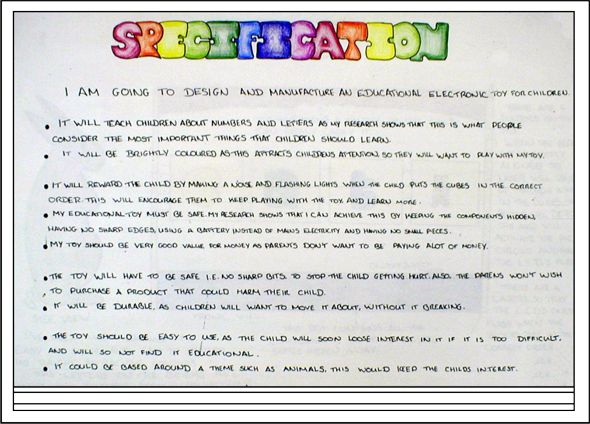
The IBO says that the design specification is "A detailed description of the conditions, requirements and restrictions with which a design must comply. This is a precise and accurate list of facts such as conditions, dimensions, materials, process and methods that are important for the designer and for the user. All appropriate solutions will need to comply with the design specification."

Include a detailed list of 5 specifications.

Then create a test that will help you evaluate your product/solution in Criterion E - Evaluate.

________________________________________________________________________________
Let's brainstorm some possible design specifications . . .


3.  Formulate a Design Specification

My Prezi must possess the following characteristics:

1.       Correct spelling   This is a good design specification because. . .
2.    
3.    
4.    
5.    

To test my Prezi I will create a questionnaire. On a scale of 1-5 (1=awful, 5=awesome) I will ask the following questions:

1.
2.
3.
4.
5.

Investigate due date  September 30 at the beginning of class.

IB Learner Profile: Thinker

Learning Objectives: The student will list, with little guidance, the specific requirements that must be met by the product/solution and design, with limited guidance, tests to evaluate the product/solution against the design specification. The student will design, with guidance, tests to evaluate the product/solution against the design specification.

Thursday, September 12, 2013

Investigate - 2. Develop A Design Brief

FINISH  ON/BEFORE  SEPTEMBER 22

To learn more about Prezi click here

Year 8, each one of you has completed the Identify the Problem.  Yoohoo!  You did a good job.  Now, let's move on.

Remember that at the beginning of each class we get together and discuss what the goals and objectives of the daily assignment is.  I explain exactly what is expected of you.  If you don't understand the assignment, raise your hand and I will be happy to offer you further information.

2.  Develop a Design Brief

Introduce this section by writing a small sentence explaining that this is the section of the Investigate in which you will do research (ask and answer questions) that will help you solve your unit problem. (for example: The following research questions will give me enough knowledge to solve my unit question.)

Then, research the following questions:
1.  What is Prezi? (Include a definition using your own words.)
2.  Look at 2 Prezi's to get ideas and information to help you make a creative presentation.
      https://sites.google.com/site/prezilinks/home/prezi-examlpes

  • Include printscreen of Prezi
  • Describe what the presentation is about
  • Do you like it?  Why or why not?
  • Did you get any ideas that you would like to use in your Prezi
3.  Gather information on your topic to put on your Prezi to share with others.
Use in-text referencing and include images to support your work.

IB Learner Profile - Inquirer

Learning objectives: The student will identify websites as possible sources of information, learn how to reference sources.